Server setup
Playify comes with powerful administrative commands to help you manage how it interacts with your server.
Setting up a music channel (/setup controller)
Section titled “Setting up a music channel (/setup controller)”By default, Playify sends ephemeral or standard messages to reply to commands. However, you can create a dedicated music channel with a persistent controller.
How to use it:
Section titled “How to use it:”- Create a text channel specifically for the bot (e.g.,
#music). - Type
/setup controllerinside that channel. - Playify will send a beautiful, interactive dashboard message with playback controls (pause, skip, stop, queue) right in the channel.
[!TIP] The controller is smart! Whenever a new song starts or the queue changes, it will dynamically update itself. It will also “re-anchor” itself to the bottom of the channel if users send other messages.
Channel restriction (/setup allowlist)
Section titled “Channel restriction (/setup allowlist)”If you have a large server, you might want to prevent users from spamming /play commands in general chat rooms.
Restricting commands:
Section titled “Restricting commands:”Use the /setup allowlist command. You can specify up to 5 text channels where the bot is allowed to be used.
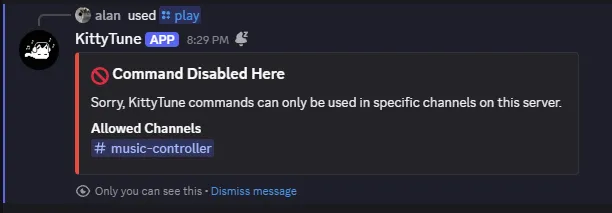
/setup allowlist channel1:#music channel2:#bot-commandsOnce configured, anyone trying to use Playify outside of these channels will receive an error message.
[!NOTE] Admin Bypass: Users with the Manage Server (
manage_guild) permission or Server Administrators bypass channel allowlist restrictions and can use bot commands in any channel.
Resetting the allowlist:
Section titled “Resetting the allowlist:”To allow commands everywhere again, run:
/setup allowlist reset:defaultKawaii mode (/kaomoji)
Section titled “Kawaii mode (/kaomoji)”As a fun easter egg, administrators can run the /kaomoji command.
This completely overrides the bot’s locale strictly to en-x-kawaii.
When activated, all messages, error codes, and responses will be transformed into a cute format using pink embeds and kaomojis ((≧◡≦), (╥﹏╥)). Run it again to disable it.